
In the world of search engine optimization (SEO), indexing is one of the key phases that determines the visibility of a website and its individual pages in search engines – Google, Bing, Yahoo and others. In this article, I will tell you what indexing is and how it works, how to check site indexing and how to properly close a site from this process.
What is indexing in simple words
Indexing is the process in which search engines (search spiders or bots) scan websites to gather information about their content. These robots follow links between pages and analyze content. After collecting the data, they add the information to the search engine index.
An index is a large database containing collected data about website pages. It helps search engines quickly find pages that match user queries. The more quality and relevant content collected in the index, the more effective the search will be for users.
How the site is indexed
In order to understand the topic “How to prohibit the indexing of a site?”, you should first understand the process of indexing.
Search engines start indexing from the transition to the site. Let’s imagine that you are working with the site and you want to index it. There are the following stages for this:
- The search robot starts by scanning the start page of the site. It checks the HTML code, images, links and other elements on the page.
- Follow links to other pages. The crawler follows the links found on the main page and crawls others. For example, if the main page has a link other page, the robot will go to it.
- The search robot analyzes the content of visited pages, collecting text, images, videos and other content elements. The page has a list of articles and other information. This is exactly what work is needed for.
- After collecting the information, the search robot adds the page to its index. This helps the search engine to find it when the user enters relevant queries.
- Updates and re-indexing. Crawlers periodically return to each site to update information and find new content. They scan these changes and update the index.
- Display in search results. When a user enters a query into a search engine, it uses its index to find the most relevant pages. For example, when a user searches for “How to Create SEO-Friendly Website Architecture”, the search engine uses the index to find the page and displays it in the results.
Site indexing is a complex process that allows search engines to efficiently find and display relevant pages in search results. This helps both SEO specialists and site owners improve visibility and ensure optimal interaction with search engines.
How to check site indexing
Indexing is important because it allows you to make sure that search engines correctly understand the website and the content that is presented to users. You can find out if the site is indexed by the following methods:
1. Use Google Search Console. If you are the owner of the site, be sure to register it in Google Search Console. This is a free tool from Google. It provides information about how Google sees your website, reports on page indexing, error detection and much more. To check your indexing through Google Search Console, go to the Pages tab. There you can see how many pages are indexed, as well as which of them have problems.
2. Use the “site:” command in search engines. It allows you to check how many pages of a particular site are indexed in a certain search engine. For example, typing “site: netpeak.net” into Google will show all the pages that are indexed from this site.
However, this is a rather inaccurate way of obtaining information about the indexing of the site and its individual pages. But at the same time, it is a useful method, because in combination with other operators, it allows you to find certain pages with attachments/parameters that should be hidden from indexing on our site. Also, this method allows you to learn about the indexing of individual pages or competitors’ sites.
3. There are also various services that inform about site indexing. For example, allows you to find out whether a site or pages are in issue. Other services: Ahrefs, SEMrush, etc. — help monitor indexing and identify possible problems.
How to close a site from indexing: effective methods
Proper control of how a website and its content are indexed by search engines is an important part of SEO optimization. In certain cases, closing pages from indexing can be appropriate and useful. We are talking about the following pages:
- Test or development content. Such a page is often incomplete, not publicly viewable, or may contain errors. By closing these pages from indexing, the probability of accidental publication of unfinished content disappears.
- Pages with confidential information. Data privacy is always a priority, and if a site contains pages with personal, financial or other sensitive information, they should be blocked from indexing. This could be a page with user credentials, payment details, etc.
- Duplicate content. If the site has pages with content that is repeated on other pages, this can lead to problems with search engine rankings. Closing duplicate content from indexing will help ensure better visibility and consistency of the main page.
- Internal administrative pages. Needed to manage site content or site settings and should not be generally available. Closing from indexing will avoid the possible risk of unauthorized access and will maintain control over the administrative part.
- Custom purchase or registration pages. If the site has pages with a shopping cart, registration, placing an order, search pages, comparison, sorting, filters by price and displaying the number of products on the pages, they should be closed from indexing. After all, they form doubles.
Understanding the indexing process will help in effective optimization of the site, because this is how important and unimportant pages of the site are opened and closed.
How to close a site from indexing
There are 4 main methods that help manage indexing.
“robots” metatag
The “robots” meta tag is one of the most common ways to control the indexing of web pages. There are 4 main rules that we can use in the “robots” metathesis:
- “index” — we allow the bot to index;
- “noindex” — prohibit indexing;
- “follow” — we allow the bot to follow internal links;
- “nofollow” — we forbid links.
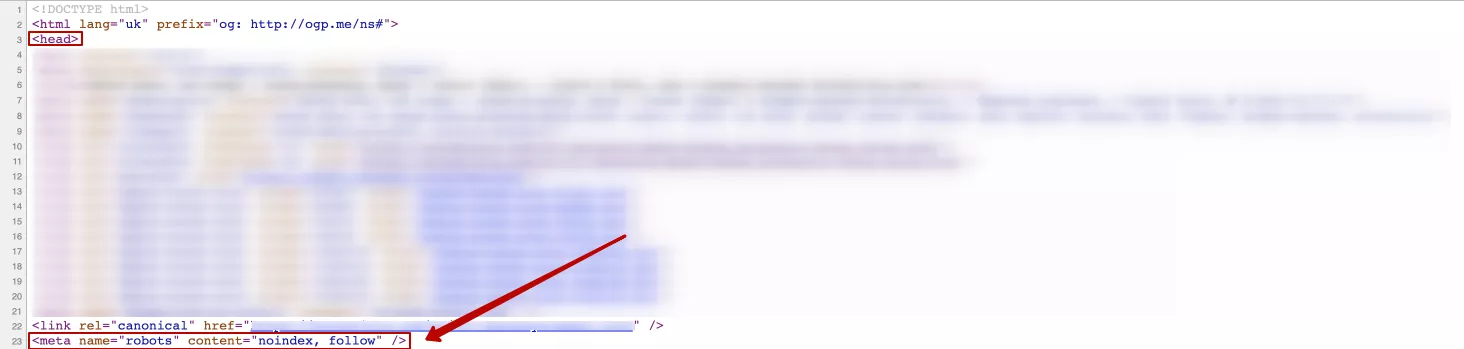
Adding a meta tag with the value “noindex” to the code of the page in the <head> block prevents search engines from indexing it. It is written like this:
<meta name=«robots» content=«noindex, follow» />Where “noindex” is a rule that prohibits indexing of the page by search engines. It is worth adding the “follow” rule, which allows you to go to work using links to another page and continue exploring the site.
Example of use:
Another option for implementing this rule, namely:
<meta name=«robots» content=«noindex, nofollow» />Where “nofollow”, respectively, prohibits the work of going through links to other pages of the site.
If you replace “robots” with “bing”, for example, the instruction will only apply to the Bing search engine robot. But if a certain page should be hidden from indexing, I recommend prescribing instructions for all search engines.
The “robots” meta tag is especially useful for individual pages that need to be protected from public access.
Importantly! Google Help says: “For the noindex rule to work, the robots.txt file must not block the search engine from accessing the page. Otherwise, it will not be able to process her code and will not detect the noindex rule. As a result, content from such a page will still appear in search results, for example, if other resources link to it.”
X-Robots-Tag in server response
The “X-Robots-Tag” header can be set at the server level or at the level of individual pages to control indexing by search engines. It tells search engines how to treat a particular page or resource. The “X-Robots-Tag” header can contain the same directives as the “robots” meta tag:
X-Robots-Tag: noindex, nofollowThe title tells search engines not to index the page (“noindex”) and not to follow the links on it (“nofollow”). The rule can be written in different variations.
You can set the “X-Robots-Tag” for a specific page or resource on the server in the server settings or use a configuration file that specifies the HTTP headers to be set for specific requests.
To configure X-Robots-Tag for the Apache server, you need to add the following code to the .htaccess file:
Header set X-Robots-Tag «noindex, nofollow»This example sets the X-Robots-Tag header for all pages on the site and prevents them from being indexed and linked.
After making changes to Apache’s .htaccess, you need to restart the web server for the changes to take effect.
To configure X-Robots-Tag for Nginx server, you need to use an additional nginx module called “add_header”. This module allows you to add HTTP headers to server responses.
- Open the configuration file for your site.
- Find the “server” block that corresponds to your site and add or edit the “add_header” line in that block to add the X-Robots-Tag header. Example:
add_header X-Robots-Tag «noindex, nofollow»In this example, as in the previous ones, the X-Robots-Tag header is set as “noindex, nofollow”, which prohibits indexing and switching to other pages of the site via the link. After making changes to the configuration file, you need to restart the Nginx web server for the changes to take effect.
Once the “X-Robots-Tag” is installed, search engines will follow the specified indexing and linking directives on the specified page or resource.
HTTP code 403 (Forbidden)
HTTP code 403 (Forbidden) indicates that the request to the server was valid, but the server refused to process it due to access restrictions. This code can be used to block a page from being indexed by search engines, and here’s how it’s usually done:
1. Creating a page to display a ban message. First, you can create a page to which users will be redirected if access is denied. For example, the page “forbidden.html” and the content that should be displayed to users when they try to access the forbidden page. If the user goes to such a page, it should have an appropriate design. And if you place a link to the main page on it (for example), the user will not be lost, but will simply go to another page of the site.
You can write information: “Sorry, but you do not have access to this page. Please contact the site administrator for access.” It is worth noting that the 403 code can be used to close not only certain pages from indexing, but also the entire site. This can be useful, for example, when you need to restrict access to users from other regions/countries.
2. Using HTTP code 403 and setting robots.txt. You need to configure the server so that it sends an HTTP code 403 when trying to access a forbidden page, and at the same time tell search engines not to crawl this page in the robots.txt file:
- HTTP code 403 The web server should be configured (for example, via an “.htaccess” file for Apache) to send an HTTP code 403 for a forbidden page;
<Files «forbidden page.html»>
   Order Allow,Deny
   Deny from all
</Files>
where “forbidden page.html” is the path to the page to be banned.
- The robots.txt file. In the robots.txt file, you should add the following line for the page you want to block from crawling.
User-agent: *
Disallow: /forbidden page.html
This entry tells search engines that /forbidden page.html should be ignored and not crawled.
After following these steps, when users try to access a forbidden page, the server will send them a 403 HTTP code and can redirect to the generated “forbidden.html” page. Search engines will also ignore this page due to the settings in the robots.txt file and it will not be indexed in their database.
Importantly! Google Help recommends not to abuse the 403 code to manage indexing. In the future, such a page may be removed from Google search. When the bot lands on a page with a 403 code, it sees an error on the user’s side, so it needs to come back later. After repeated visits and receiving the same response code, these pages may be removed from Google search.
Protect pages with a password
If you need to limit access to pages not only for search engines, but also for users, you can use password protection. It assumes that the user must enter the correct login and password to gain access to the site or individual page.
This method is especially useful in cases:
- When you need to protect the administrative interface. If there is an admin panel or other section of the site that only a limited number of users (for example, administrators) should have access to, HTTP authentication will help ensure that only those users have access.
- Test or development sites, pages. HTTP authentication can be used when developing or testing a site.
- Specialized services or resources. Some websites provide specialized services or resources that only certain groups of users should have access to. HTTP authentication helps ensure this limited access.
- Protection from public indexing. If you want to protect a page or directory from being indexed by search engines, HTTP authentication can be used as an additional layer of security after disallowing crawling in the robots.txt file. This method ensures a high level of security and privacy for users and allows access only to those with the appropriate credentials.
Conclusions
Indexing is an integral part of the SEO strategy, which helps to ensure proper visibility and relevance of the website to the target audience. It is important to check the indexing to make sure that the search engines correctly understand the content that is submitted to the users.
However, there are pages that can be blocked from indexing for a number of reasons. The following methods are used for this:
- meta tag «robots»;
- X-robots-tag;
- HTTP code 403 (Forbidden);
- protect pages with a password.
They help to effectively control the site indexing process and ensure the protection of confidential information.